Sunday, June 24, 2007

Upgrading Open Office 2.0.2 to 2.2.1

Ubuntu Dapper Drake comes with Open Office 2.0.2

Lately I experienced that my OO installation had started crashing when I tried to open some Microsoft powerpoint files. A few google searches revealed that some others also faced similar problem. But since the latest Open Office 2.2.1 is currently not supported by the Dapper repository, I was struggling with this issue.

I read this post and decided to try upgrading to 2.2.1 and the good news is that it worked......

Here is what I did (following the post indicated above)

  1. Using Synaptic Manager, I uninstalled all Open Office 2.0.2 programs

  2. Downloaded the latest deb package for Open Office using the following wet command

    wget http://www.nic.funet.fi/pub/misc/openoffice/localized/
    finnish/stable/2.2.1/latest/OOo_2.2.1_LinuxX86_install_en-US_deb.tar.gz
  3. Unpacked the resulting file using the archive package manager
  4. cd into the resulting DEBS directory
  5. Installed all the deb file using the command
    sudo dpkg -i *.deb
  6. Integrated the new OO installation in the menu by
    cd DEBS/desktop-integration
    sudo dpkg -i openoffice.org-debian-menus_2.2-9161_all.deb
I will now test the new upgraded version for the crashes that I was facing earlier.

Powered by ScribeFire.

Wednesday, June 20, 2007

Free online Ubuntu Books

Digg had a post which provides links to following free Ubuntu books.

  1. Moving to Ubuntu Linux
  2. The official Ubutu Book
  3. Ubuntu Unleashed
  4. Ubuntu Hacks
here is the link to the post on VNTUTOR blog


I am sure these will come in handy for me,


Powered by ScribeFire.

Sunday, May 27, 2007

Playing WMV files on Ubuntu - Dapper Drake

I use MPlayer to play video files on Ubuntu. However, I was not able to play WMV files so I started some google searches to see how others made it to work.


Here is what worked for me:


1. Download the required Codecs.

Playing WMV files required the win32 codecs. I download these from the following link:

Mplayer HQ


I downloaded the file called :

win32codecs-essential-20040703.tar.bz2


2. Extract the codecs to a directory

tar -xjvf win32codecs-essential-20040703.tar.bz2


3. Create a directory

sudo mkdir /usr/lib/win32


4. Copy the codecs to the new directory created above

Use the cp command or the graphical interface


5. Restart mplayer and watch the WMV videos


Happy viewing :)


Powered by ScribeFire.

Friday, May 11, 2007

Enabling SSH

My office laptop runs Ubuntu but my home desktop still has windows 2000. I often feel the need to transfer files between the two. I know that WinSCP allows one to do so. So I downloaded WinSCP, installed it on my windows destop and tried to connect to my laptop. This did not work. With a few google searches I learnt that SSH service on my laptop has to be started for winSCP to work.

Here is how SSH services can be setup:

1. Install openssh server
# sudo apt-get install openssh-server

2. Modify the setting and restart SSH server.
# sudo gedit /etc/ssh/sshd_config

In my case, my username is asood, thus I added one line to /etc/ssh/sshd_config


Protocol 2
...
PermitRootLogin no
...
AllowUsers asood

3. Restart SSH server.
# sudo /etc/init.d/ssh restart

Monday, April 30, 2007

Opening .chm file in Linux

I downloaded an ebook and was puzzled to see a .chm file. I was unable to open it on my ubuntu laptop.


A quick Google search revealed the following :

  • Chm file is a Microsoft Compressed HTML Help file in a proprietary
    format for online help files.
  • Under Linux/FreeBSD or UNIX you can open
    .chm file using following programs which make it
    possible to browse native Windows CHM files:
    1. For Gnome Desktop User

      Use gnochm program as follows

      $ gnochm file.chm
    2. For KDE Desktop User

      Use kchmviewer (very nice and highly recommended) program as follows

      $ kchmviewer file.chm
Use apt-get or yum command to install any of the above chm viewer:


# apt-get install gnochm


OR


# apt-get install kchmviewer


I installed gnochm and it worked smoothly.


I learnt the above from the FAQ section of a site  here)


Powered by ScribeFire.

Saturday, April 07, 2007

Rebranded Performancing works very well

Lately, I was unable to get Performancing to work with my blogger account.


However, today I learnt that Performancing's new avatar "ScribeFire" is available and it works with Blogger as well. Infact, I am writing this post using the same. Hope it works......


Incase, you have not heard of or used Performancing, you may want to do so. Its a great firefox sxtension that allows you to blog straight from the browser without having to log-on to your blogs admin area.


You can read more about it on www.ScribeFire.com


Powered by ScribeFire.

Sunday, March 04, 2007

Upgrading Firefox to the latest version available...

Ubuntu comes with Firefox/1.5.0.10.

I want to upgrade this to the latest version because I love the new extensions that only work with the latest version epecially, colourful tabs

So I searched the web to see how this can be done. There were two options.
1. Manual installation. here
2. Using an automated script. here

I used the automated script and it was very easy to do.

I now have the new Firefox version 2.0.0.2 installed successfully.

Finally...... Ubuntu it is....

I have finally decided to try Ubuntu. Thus I removed FC6 and installed Ubuntu Dapper 6.06 LTS. My laptop still has the dual boot option i.e. XP Pro and Ubuntu. But my plan to try and use use Ubuntu all the time... even at office.

I am hoping that this will work well for me.

Sunday, February 25, 2007

This killer app has the potential to stop me from migrating to Linux..... and I am serious


For a long time, I had been making a concerted effort to move to a Linux Desktop. Linux Desktop offered me everything that I needed or had on the windows side...... till I discovered Lauchy.

Launchy is a great Windows utility that allows you to open files, programmes, folders etc. without having to search for them. All you have to do is press Alt+ space bar and then first few letters of the fileor app that you want and there you have it. Its one of the most impactful productivity tool that I have seen in the last few months. And its free to use.


Hats off to Launchy and Josh Karlin

I hope there is a similar killer app on Linux side as well. I have used this for a few months and I can't live without it. I can't see a reason why Microsoft would not add this to its OS soon.

You must try this tool if you are a windows user.

Thursday, February 22, 2007

Choosing a WIKI for my office team

I want to install a WIKI in my office. With so many options, it is a bit difficult to decide which one to install.

Initially, I had a very rough idea of the parameters that I should compare. But then I came across Wikimatrix. It allows you to compare the features of a number of Wikis.

It has a nice 'choice wizard'. Questions asked by this 'choice wizard' gave me a broader idea of the parameters that I should compare. I used the wizard but was confused when it gave me a choice of over 20 wikis that matched by requirements. However, it provides extensive details about each of the wikis.

I am now planning to check out, DekiWiki and SocialText

Tuesday, November 14, 2006

Free Mobile Bill Analyser

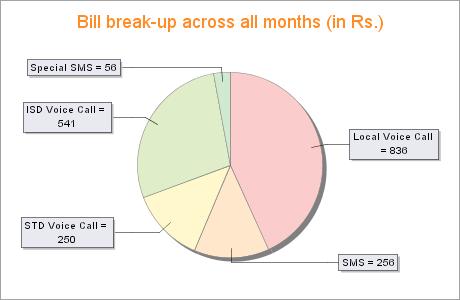
I read about YourBillBuddy.com service in the newspaper today. It is an interesting solution for finding the best (as in value for money) mobile plan in market. Here is how it works:
  1. It lets you upload 5 mobile bills of yours in standard PDF or HTML format in which mobile providers give you the e-bills.
  2. It analyses these bills and shows you a couple of charts (like the one shown here)
  3. Then it also recommends plans (from the current ones) that will help you reduce your monthly bill. It also gives an estimate of the average monthly bill with the new plan.
  4. It currently supports following service providers : Airtel, Hutch, Reliance, TataIndicom, BSNL and Spice
How to benefit from this service:

1. In current scenario where number portability is not available, you may want to use this service as a way of finding the most economical plan offered by your existing service providers. Typically, it is difficult to keep up with the news plans launched by Telcos. This may be an easy way out.

2. Once Number portability is offered to Indian consumers, then this service will be a hit. Then you can even look at changing service providers to get the most economical solution and retain the same phone number.

its very easy to use....easy registration process.......and good interface..... do try.

Friday, November 10, 2006

WOW...... Firefox's interesting extension "Tab Catalog"

As I mentioned in my earlier post, I found one feature in FC6 very impressive where taking the pointer to right side top of the screen shows a tiled view of all open applications.

Since I also use Windows, I was hoping to get the same functionality in windows.

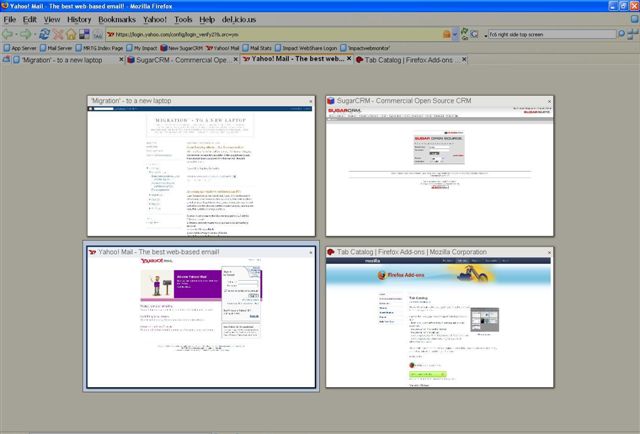
And today, I learnt about this new cool extension for Firefox "Tab Catalog" which offer something similar. Here is how it works:
If you have a number of tabs open in firefox,
with press of a button or by taking your mouse over a toolbar button,
it shows thumbnail-style catalogs of all open tabs.

You can see a sample pic below.

Wednesday, November 08, 2006

Great Desktop effects.....but browser is slow

After enabling the Desktop effects in FC6, I find that scrolling in a web browser become slow and jerky. I tried a quick search and found similar questions posted by others as well. One such example is here .

I am still looking for a fix for this.

Accessing my windows partition from FC6

I use Thunderbird as the default mail client. I do this because it allows me to access the same data i.e. emails, from both windows as well as linux. To get this to work, Linux should allow me to read and write onto the windows partition where the email data files are kept. This partition is a fat32 partition.

In order to get access to the windows fat32 partition, I did the following as root :
1. Create a directory where you would like to mount the fat32 partition
2. Open the file /var/fstab
3. Add the following at the end of the file
/dev/hda2 /wind vfat umask=000 0 0
Inmy case, hda2 is my fat32 partition and /wind is the directory that I created for mounting the fat32 partition.
4. Reboot (I am sure there may be other ways as well, but this is the easiest that I know.....will learn those soon ;) )

Now I was able to access the fat32 partition and had both read as well write access to it.

FC6 is impressive

#OS#
I installed FC6 on my notebook yesterday. It took around an hour but the setup was absolutely smooth. And I must confess that FC6 impressed me much much much more than Windows Vista. If you think that Aero Glass feature in Windows Vista is ground breaking......then you better check out what FC6 offers e.g.
1. The aero glass functionality runs out-of-box without any special configuration required. All you need to do is: Go to SYSTEM >> PREFERENCES>> DESKTOP EFFECTS >> ENABLE DEKTOP EFFECTS
And you have to see the effects to believe them.

2. Most impressive feature is the following : Imagine you have a number of application windows open, as soon as you take your mouse to the right hand side top of the screen, all open app windows are tiled on the screen so that you can choose the one that you want to go to. This, in my opinion, will serve as a productivity enhancer as well.

I am impressed to see how smoothly all these functions are running on my 1GB, Centrino powered notebook

Saturday, August 19, 2006

#Wireless router#
Today I faced an interesting problem. A friend bought a new linksys 802.11g wireless router. He connected that to his airtel (indian telecom & isp) broadband connection. After making the necessary connections, he found that wireless network was working fine but he was unable to access internet. The router did not give any error message. So it was not clear as to what the problem was. The router was set on automatic IP assignment. It was also getting the IP from the airtel broadband modem (beetel make). However, I found that it was unable to get the gateway address. this was surprising. I tried to renew the IP but again it picked up all settings ie. IP, DNS but not the gateway.
Earlier I hadworked with DLink wireless routers. The factory gateway IP setting for them is 192.168.0.1. However, for Linksys the gateway is 192.168.1.1. I then decided to check the gateway for the airtel modem. I did this by connecting my laptop to the airtel modem directly. The laptop was set on DHCP and so it picked up th settings quickly. I ran ipconfig on windows command prompt found that airtel modem's gateway is also 192.168.1.1. So this was the problem.
the linksys router did not pick up airtel modem ip as gateway because its ip was also 192.168.1.1.
I therefore changed the wireless router's ip to 192.168.0.1, rebooted it and within seconds I was able to access the internet wirelessly on my laptop.
learning : when connecting two routers make sure that their factory set ip's are different. I know that this is very basic but at times one tends to forget to check the same.
The linksys router cost my friend Rs. 2650 with three years warranty. Bought from Nehru Place, new delhi, india.

Sunday, July 30, 2006

#Buying a new laptop#
A friend of mine (Kunal), is going to Insead business school. He asked me to suggest which laptop he should buy.
My Take
Don't blow your money on the fastest processor in the market...there are other parts as well which deserve equal attention. One needs to choose an overall config rather than just the processor speed. I say this because I find that most buyers, especially first time buyers focus more on the processor speeds. As my friend asked me 'should I buy 1.8 ghz or 2 ghz based laptop'.
A computer is nothing more than different parts working together as a team. And as they say 'a team is only as strong/ fast as the weakest/slowest member in the team'. thus you mean find that 1.5ghz base laptop with faster hard disk and better graphics card may be better than 2ghz laptop with a slower hard disk and standard graphics card.

Here is how I go about making a choice:
1. Processor : anything above 1.7 ghz is fine as long as I will only be using it as a normal business user (basic word processing, email, browsing and occasional video playing). If you have lots of money, go for the dual core processors.

2. RAM : another very important part. Minimum 512mb and 1gb if you really want windows on your machine to fly.

3. Hard disk : Yes, capacity is important. But if you want a really fast machine, speed of the hard disk is very impotant. Its measure is revolutions per minute. 5400 rpm is standard and slow. So look for 7200 rpm hard disk.

4. Graphics card : for a business user any standard graphic card is good. But if you want to play some 3d games, then you must have a good video card with dedicated memory. Also check what resolutions are supported.

5. Battery: most buyers do not review this carefully and then complain on getting only 1.5 hours of backup. You should have a minimum of 6 cell battery for around 3 hrs backup on most machines. But you can also pickup a 9 cell battery if you can shell out some extra $$.

6. Size : please check out the size and weight of the laptop very carefully. I have seen people end up buying desktop replacement pcs instead of a laptop. When it comes to screen size big certainly is beautiful but remember that it will be your shoulders that will have to carry it arpund. 14.1'' is a decent size and under 2.2 kgs is good weght for business users. For me 'small is more beautiful' when it comes to laptops.

7. Business vs home : all major brands have two categories of laptops. One for home users and the other for business users. The difference lies in the architecture and the design. You can expect a home user targetted laptop to turn sluggish if it is used for long hours. It will however look very nice, cosmetically, compared to the laptop targetted for business users. Then how to choose? if you want to keep your machine switched on for more than 10 hours at a stretch buy a business notebook.

I guess above should take care of most of the performance related issues. Now all you need to do is see which brand/ model excites you the most. This is very personal, and you will be the best judge.

Happy purchasing!

Sunday, July 23, 2006

#OS#

I got hold of the latest Fedora distro FC5 from an expert friend.

I was skeptical whether FC5 will smoothly install on a laptop without messing my Windows XP partition.

I popped the DVD and started the installation. It took a little over an hour for me but I was able to setup FC5 smoothly.

Most interesting aspect of this whole process was the ease with which FC5 detected all my laptop hardware very well. Considering the fact that my machine did not have the standard graphics card, this was really commendable.

Infact, I had lot of problems in installing Windows XP professional from the original Retail version on my earlier IBM R50E laptop. It messed up with the drivers for LAN, sound, graphics. I then had to visit the IBM (Lenovo) website to pick up the drivers.
#e-mail#
Which email client is best for me?

After all this..... my windows XP Professional was live and kicking....

Before I did any more testing.... I wanted to get my e-mail up and running....so next I had to decide - Which e-mail client do I use? '

Popular choices available were :
1. Microsoft Outlook
2. Microsoft Otlook Express
3. Thunderbird
4. Eudora

I had used both outlook and Eduora in the past.

This would have been a no-brainer under normal circumstances, specially when my Microsoft office Profesional license already covered the license for Microsoft Outlook. So I have already paid for one of the most popular e-mail clients .

But my situation was different. I was very keen to start using Linux on my laptop as well. And I knew that unless my business email is not available on Linux, I will not be able to even try it. Which meant that e-mails that I pop fom my server, onto the laptop, should be available on windows as well as Linux.

A tough requirement......... may be not....

Interestingly, I learnt from a friend that Thunderbird installation from Windows side as well as Linux side can access the same email data if the data is kept on a FAT partition. And so I selected Thunderbird over Microsoft Outlook.

Friday, May 05, 2006

#PALM#
Blogging from my Treo
My first test post from my treo. This is so cool. I am using plogit.

Testing a re-edit. :)