Sunday, May 25, 2008

Free Wi Fi Internet Access for Passengers at Bengaluru International Airport


My first flight from the new BIAL (its just opened 2 days back)

It offers free internet access to all passengers for one hour (per login; so you can request a new password if you are waiting over an hour)

How to get password:
Send an SMS to 56677 with the content "WIFI BIAL".
You will get a password by return SMS

I received the password with 45seconds and was able to logon quickly. (adding this post through the same connection)

a. browsing worked
b. messengers worked
c. ssh did not work
d. It did not allow POPping mail
d. ip assigned 172.16.0.207

Thursday, May 22, 2008

Healthy (Unknown) Partition issue solved

After re-installing Windows XP from Pre-desktop area, one of my FAT 32 partitions was not visible to Windows. Disk Management utility was reporting this partition as "Healthy (unknown) Partition - FAT 32"
... I found this funny

Anyway, here is how the problem was solved (with help from a geek friend)
PLEASE NOTE : Take backup of your data before you try these steps.
  1. I booted into Ubuntu. Ubuntu had not problem in identifying and accessing the same FAT 32 partition
  2. As root, I started FDISK using the following command
    fdisk /dev/sda
    entered p to print partition table
    This displayed the following:
    Device Boot Start End Blocks Id System
    /dev/sda1 * 1 2042 15437488+ 7 HPFS/NTFS
    /dev/sda2 2043 5418 25521615 c Hidden W95 FAT32
  3. In the above I noticed that the partition type was set as Hidden W95 FAT32 instead of W95 FAT32 (LBA). So I changed the same with following steps
    t (to change a partition's system id)
    Enter the partition number. in my case its 2
    Partition number (1-7): 2
    Enter the Hex code for the partition type W95 FAT32 (LBA) i.e. c
    Hex code (type L to list codes): c
  4. Commited the above changes by entering w

The above solved my problem. Next time when I booted into Windows, I could see and access the FAT32 partition.

Monday, May 05, 2008

Upgraded to Ubuntu 8.04

Last week I upgraded to Ubuntu 8.04. Again, like earlier Ubuntu installations, the installation was easy and trouble free. I decided to do a fresh install instead of an upgrade.

Why did I upgrade?
No specific reason. I just love Ubuntu and was keen to see what new it has to offer.

Did I find anything GREAT after install?
Not really.... (but I do not care.... I am not a techie) ....
I do however like:
a. World Clock Applet with multi city display
b. all new Firefox
c. The wallpaper

The installation experience was really neat.

The link below has an official list of what's new in 8.04, just in case you would like to read.
What's new in 8.04

Interesting I also re-installed WinXP using my Tinkpad Pre-Desktop area. Surprisingly, Ubuntu installation and setup was easier. :)
But that's a different story. I am still struggling to get my FAT32 partition visible in windows. The Disk Manager shows that partition as HEALTHY but not recognised partition. I do not know what to do with it...... will search for a solution soon.

Tuesday, November 27, 2007

My new toy........ Nokia E61i

Few months back I had started my search for a new mobile and bought the HTC TyTN I or HTC Hermes. Its a nice and powerful device but I had to give it up because :
a. I am so much used to the Treo form factor that the sliding QWERTY keyword did not work for me.
b. HTC Hermes is a battery guzzler. I was not using the device for voice but still I had to charge it atleast once everyday unlike my Treo 600 that runs for 2 days even with voice usage.
c. Though Hermes has a 400 MHz processor, the speed still sucks. Probably the 64MB RAM acts as a bottleneck.

Anyway, this time I had to buy a phone for my wife and I got her a Nokia e61i yesterday. Its got everything that I wanted (listed here). My initial reactions to the phone are:

POSITIVES
1. E61i runs S60 3rd edition which has a nice/ user friendly interface. Infact one of my biggest worries has always been that no phone offers an interface as convenient as Palm Treo but e61i seems to take care of this issue.
2. The screen size and clarity of e61i is very good. Allows for easy browsing of sites.
3. The built in browser has two very nice features :one- when you scroll on a page, it shows a thumbnail of the entire page and shows a small windows that indicates what part of the entire page you are on. two- when you press the back button it shows all previously visited sites/ pages and gives an effect similar to the switch applications effect in Windows Vista or Compiz.

NEGATIVES
1. Though its nicely/ neatly built, it is huge. Does not fit my palm comfortable.
2. Very less freewares are available for S60 3rd edition. e.g. I have been searching for a freeware messenger that support MSN, GTalk, Yahoo and Skype. So far, I could only find Agile Messenger but it seems that its not a feeware. For some reason some sites indicated that it is freeware.
I don't want to spend on buying basic softwares and normally use freewares on my Palm Treo which work very well.

Will write more once I get more time to play with it.

Thursday, November 01, 2007

Can Ubuntu damage my hard drive.... NO WAY

Yesterday I read a story on Slashdot which claimed that the power management features of Ubuntu kill the laptop's hard drive faster if you run it on battery. I got worried and started searching for more info on the same.

Today, I read another story on Digg which clarified this issue and also lead me to this post. It clearly explains that :
  1. this is not an ubuntu feature/ issue by default
  2. yes, Ubuntu offers a setting which, if enabled,could lead to decreasing your hard disk's life span. This setting is however desabled by default.
  3. usually, Ubuntu uses the same power management settings that are set in the BIOS. Thus one needs to check the BIOS settings first and then worry about Ubuntu settings.
Thanks to Matthew Garrett for the clear description.


Powered by ScribeFire.

Sunday, October 21, 2007

Gutsy Gibbon - Ubuntu 7.10 is super cool

This is the first time that I have adopted a new linux distro within 2 days of it being launched. Ubuntu launched Gutsy Gibbon (code name for Ubuntu 7.10, the latest Ubuntu release) on oct 18 (press release) and I managed to install it on Oct 20 and its fully functional...... yes all eye candy, desktop effects, also work and they are GREAT!

I am truly impressed and here are a few reasons why :

1. Installing Gutsy gibbon was easy and fast.
It took me exactly 35 minutes to install it. Before you compare it with benchmarks, please note that I am not a geek.... i do not understand kernels and more. Infact I still remember that installation of windows XP from the IBM Pre-desktop area took me more time.

2. Everything worked out of the box. I did not have to download or install any proprietary drivers. Ironically, with Windows XP (retail version) installation earlier, I was forced to download some drivers from the IBM website.

3. I have an ATI FireGL card on my laptop and Compiz is working fine without the need of installing the proprietary drivers. I am amazed. With Dapper Drake, I tried and tried but could not get compiz to work. Here it is working from the word go. I have also installed CompizConfig Settings Manager that allows additional desktop effects. Again installation of CompizConfig Settings Manager was also very smooth. I used the Synaptic Package manager and it only took 3 clicks.

So this is a good start. All I need to do now is to get the other essentials like thunderbird, mplayer etc....

:)

Thanks Canonical!!!!

Forlong's blog
has a great description of the advanced desktop effects and their 'real' benefits. you can read it here.

Friday, July 27, 2007

A Pocket PC : HTC TyTN/ Hermes/ Cingular 8500

I am a Treo 600 user. Lately, I had been wanting to upgrade my mobile device. I wanted something which would offer :
1. a QWERTY keyword (.... Treo spoilt me)
2. WiFi capabilties
3. EDGE Support
4. No Camera (I use the phone at work and a number of my clients do not appreciate camera phones in their offices)
5. 3G support (not too critical though)

A Treo 680, 700 or 750 would have been a natural choice for me. However, Treo's still do not support WiFi. Treos running Windows mobile OS support the WiFi SD Card but ones with PalmOS do not. So I thought that if I have to move to a windows mobile then why not try something different than a Treo.

After reviewing all other options available, I settled on HTC TyTN or Hermes. It met all my requirements as it has a nice sliding QWERTY keyboard, WiFi, Edge, 3G.........but only one problem....rather two.... It has two cameras. One 2 MP camera at the back for taking pictures and one VGA camera on the front for video calling.

I learnt that AT&T (formerly Cingular) in USA offers the same phone without the camera. The model is called Cingular 8500 or AT&T 8500 (detailed specs). So I picked up one Cingular 8500 in US. It was locked to Cingular network and I had to unlock it to be able to use it in India. After unlocking, Cingular 8500 works nice. But I seriously hope that it lives up to my expectations. I now need to find applications for this new device.

P.S.
I still LOVE my Treo. I wish it supported WiFi :(

Sunday, June 24, 2007

Upgrading Open Office 2.0.2 to 2.2.1

Ubuntu Dapper Drake comes with Open Office 2.0.2

Lately I experienced that my OO installation had started crashing when I tried to open some Microsoft powerpoint files. A few google searches revealed that some others also faced similar problem. But since the latest Open Office 2.2.1 is currently not supported by the Dapper repository, I was struggling with this issue.

I read this post and decided to try upgrading to 2.2.1 and the good news is that it worked......

Here is what I did (following the post indicated above)

  1. Using Synaptic Manager, I uninstalled all Open Office 2.0.2 programs

  2. Downloaded the latest deb package for Open Office using the following wet command

    wget http://www.nic.funet.fi/pub/misc/openoffice/localized/
    finnish/stable/2.2.1/latest/OOo_2.2.1_LinuxX86_install_en-US_deb.tar.gz
  3. Unpacked the resulting file using the archive package manager
  4. cd into the resulting DEBS directory
  5. Installed all the deb file using the command
    sudo dpkg -i *.deb
  6. Integrated the new OO installation in the menu by
    cd DEBS/desktop-integration
    sudo dpkg -i openoffice.org-debian-menus_2.2-9161_all.deb
I will now test the new upgraded version for the crashes that I was facing earlier.

Powered by ScribeFire.

Wednesday, June 20, 2007

Free online Ubuntu Books

Digg had a post which provides links to following free Ubuntu books.

  1. Moving to Ubuntu Linux
  2. The official Ubutu Book
  3. Ubuntu Unleashed
  4. Ubuntu Hacks
here is the link to the post on VNTUTOR blog


I am sure these will come in handy for me,


Powered by ScribeFire.

Sunday, May 27, 2007

Playing WMV files on Ubuntu - Dapper Drake

I use MPlayer to play video files on Ubuntu. However, I was not able to play WMV files so I started some google searches to see how others made it to work.


Here is what worked for me:


1. Download the required Codecs.

Playing WMV files required the win32 codecs. I download these from the following link:

Mplayer HQ


I downloaded the file called :

win32codecs-essential-20040703.tar.bz2


2. Extract the codecs to a directory

tar -xjvf win32codecs-essential-20040703.tar.bz2


3. Create a directory

sudo mkdir /usr/lib/win32


4. Copy the codecs to the new directory created above

Use the cp command or the graphical interface


5. Restart mplayer and watch the WMV videos


Happy viewing :)


Powered by ScribeFire.

Friday, May 11, 2007

Enabling SSH

My office laptop runs Ubuntu but my home desktop still has windows 2000. I often feel the need to transfer files between the two. I know that WinSCP allows one to do so. So I downloaded WinSCP, installed it on my windows destop and tried to connect to my laptop. This did not work. With a few google searches I learnt that SSH service on my laptop has to be started for winSCP to work.

Here is how SSH services can be setup:

1. Install openssh server
# sudo apt-get install openssh-server

2. Modify the setting and restart SSH server.
# sudo gedit /etc/ssh/sshd_config

In my case, my username is asood, thus I added one line to /etc/ssh/sshd_config


Protocol 2
...
PermitRootLogin no
...
AllowUsers asood

3. Restart SSH server.
# sudo /etc/init.d/ssh restart

Monday, April 30, 2007

Opening .chm file in Linux

I downloaded an ebook and was puzzled to see a .chm file. I was unable to open it on my ubuntu laptop.


A quick Google search revealed the following :

  • Chm file is a Microsoft Compressed HTML Help file in a proprietary
    format for online help files.
  • Under Linux/FreeBSD or UNIX you can open
    .chm file using following programs which make it
    possible to browse native Windows CHM files:
    1. For Gnome Desktop User

      Use gnochm program as follows

      $ gnochm file.chm
    2. For KDE Desktop User

      Use kchmviewer (very nice and highly recommended) program as follows

      $ kchmviewer file.chm
Use apt-get or yum command to install any of the above chm viewer:


# apt-get install gnochm


OR


# apt-get install kchmviewer


I installed gnochm and it worked smoothly.


I learnt the above from the FAQ section of a site  here)


Powered by ScribeFire.

Saturday, April 07, 2007

Rebranded Performancing works very well

Lately, I was unable to get Performancing to work with my blogger account.


However, today I learnt that Performancing's new avatar "ScribeFire" is available and it works with Blogger as well. Infact, I am writing this post using the same. Hope it works......


Incase, you have not heard of or used Performancing, you may want to do so. Its a great firefox sxtension that allows you to blog straight from the browser without having to log-on to your blogs admin area.


You can read more about it on www.ScribeFire.com


Powered by ScribeFire.

Sunday, March 04, 2007

Upgrading Firefox to the latest version available...

Ubuntu comes with Firefox/1.5.0.10.

I want to upgrade this to the latest version because I love the new extensions that only work with the latest version epecially, colourful tabs

So I searched the web to see how this can be done. There were two options.
1. Manual installation. here
2. Using an automated script. here

I used the automated script and it was very easy to do.

I now have the new Firefox version 2.0.0.2 installed successfully.

Finally...... Ubuntu it is....

I have finally decided to try Ubuntu. Thus I removed FC6 and installed Ubuntu Dapper 6.06 LTS. My laptop still has the dual boot option i.e. XP Pro and Ubuntu. But my plan to try and use use Ubuntu all the time... even at office.

I am hoping that this will work well for me.

Sunday, February 25, 2007

This killer app has the potential to stop me from migrating to Linux..... and I am serious


For a long time, I had been making a concerted effort to move to a Linux Desktop. Linux Desktop offered me everything that I needed or had on the windows side...... till I discovered Lauchy.

Launchy is a great Windows utility that allows you to open files, programmes, folders etc. without having to search for them. All you have to do is press Alt+ space bar and then first few letters of the fileor app that you want and there you have it. Its one of the most impactful productivity tool that I have seen in the last few months. And its free to use.


Hats off to Launchy and Josh Karlin

I hope there is a similar killer app on Linux side as well. I have used this for a few months and I can't live without it. I can't see a reason why Microsoft would not add this to its OS soon.

You must try this tool if you are a windows user.

Thursday, February 22, 2007

Choosing a WIKI for my office team

I want to install a WIKI in my office. With so many options, it is a bit difficult to decide which one to install.

Initially, I had a very rough idea of the parameters that I should compare. But then I came across Wikimatrix. It allows you to compare the features of a number of Wikis.

It has a nice 'choice wizard'. Questions asked by this 'choice wizard' gave me a broader idea of the parameters that I should compare. I used the wizard but was confused when it gave me a choice of over 20 wikis that matched by requirements. However, it provides extensive details about each of the wikis.

I am now planning to check out, DekiWiki and SocialText

Tuesday, November 14, 2006

Free Mobile Bill Analyser

I read about YourBillBuddy.com service in the newspaper today. It is an interesting solution for finding the best (as in value for money) mobile plan in market. Here is how it works:
  1. It lets you upload 5 mobile bills of yours in standard PDF or HTML format in which mobile providers give you the e-bills.
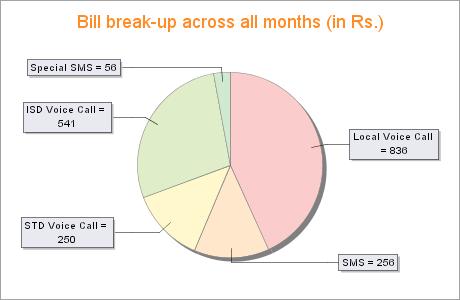
  2. It analyses these bills and shows you a couple of charts (like the one shown here)
  3. Then it also recommends plans (from the current ones) that will help you reduce your monthly bill. It also gives an estimate of the average monthly bill with the new plan.
  4. It currently supports following service providers : Airtel, Hutch, Reliance, TataIndicom, BSNL and Spice
How to benefit from this service:

1. In current scenario where number portability is not available, you may want to use this service as a way of finding the most economical plan offered by your existing service providers. Typically, it is difficult to keep up with the news plans launched by Telcos. This may be an easy way out.

2. Once Number portability is offered to Indian consumers, then this service will be a hit. Then you can even look at changing service providers to get the most economical solution and retain the same phone number.

its very easy to use....easy registration process.......and good interface..... do try.

Friday, November 10, 2006

WOW...... Firefox's interesting extension "Tab Catalog"

As I mentioned in my earlier post, I found one feature in FC6 very impressive where taking the pointer to right side top of the screen shows a tiled view of all open applications.

Since I also use Windows, I was hoping to get the same functionality in windows.

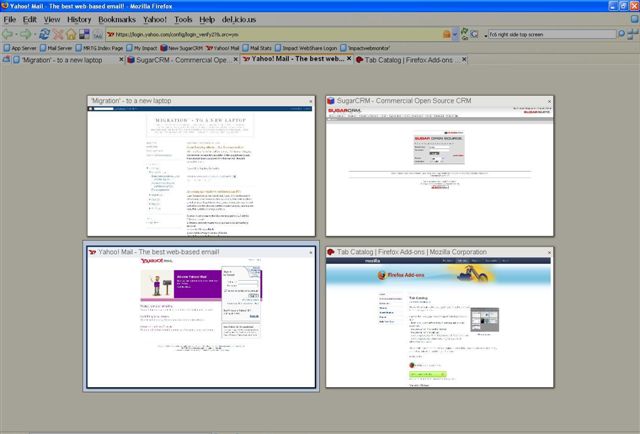
And today, I learnt about this new cool extension for Firefox "Tab Catalog" which offer something similar. Here is how it works:
If you have a number of tabs open in firefox,
with press of a button or by taking your mouse over a toolbar button,
it shows thumbnail-style catalogs of all open tabs.

You can see a sample pic below.